> For the complete documentation index, see [llms.txt](https://docs.mnspro.cloud/llms.txt). Markdown versions of documentation pages are available by appending `.md` to page URLs; this page is available as [Markdown](https://docs.mnspro.cloud/administration-my.mnspro.cloud/downloadbereich/download-der-office-apps.md).
# Download der Office-Apps
Falls Sie über Lizenzpläne, welche die Nutzung der Offlineversionen der M365-Apps beinhalten, verfügen, können Sie diese auch auf Ihren privaten Windows- und MacOS-Endgeräten herunterladen.
Zu diesen Plänen zählen unter anderem:
* Microsoft 365 Apps
* Office 365 A1 Plus
* Office 365 A3
* Office 365 A5
{% hint style="info" %}
Auf den schulischen über MNSpro Cloud MDM verwalteten Endgeräten ist Office bereits vorinstalliert, so dass Sie dies nicht manuell installieren müssen.
{% endhint %}
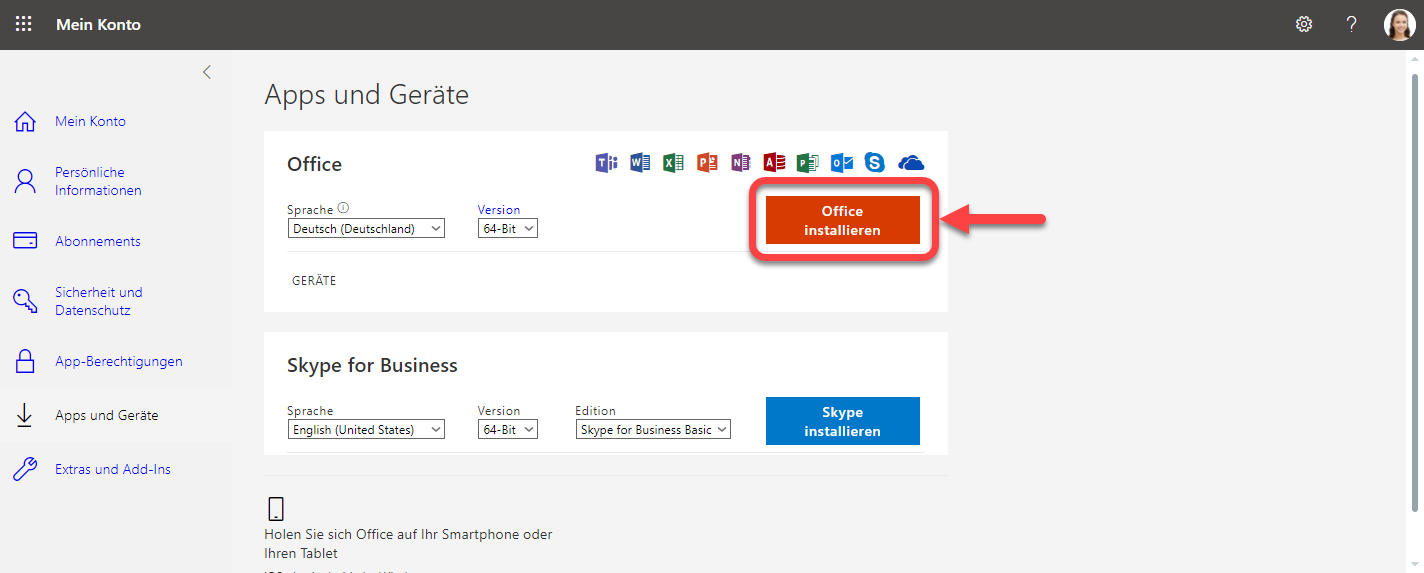
Wenn Sie neue Software herunterladen und an Ihrer Schule nutzen möchten, gehen Sie auf portal.office.com und wählen Sie die gewünschte Anwendung aus.
Office-Download
Für die Installation der Office-Apps folgen Sie den Bildschirmanweisungen.
---
# Agent Instructions
This documentation is published with GitBook. GitBook is the documentation platform designed so that both humans and AI agents can read, navigate, and reason over technical content effectively. Learn more at gitbook.com.
## Querying This Documentation
If you need additional information that is not directly available in this page, you can query the documentation dynamically by asking a question.
Perform an HTTP GET request on the current page URL with the `ask` query parameter, and the optional `goal` query parameter:
```
GET https://docs.mnspro.cloud/administration-my.mnspro.cloud/downloadbereich/download-der-office-apps.md?ask=&goal=
```
`ask` is the immediate question: it should be specific, self-contained, and written in natural language.
`goal` is optional and describes the broader end goal you are ultimately trying to accomplish on behalf of the user. GitBook uses it to tailor the answer towards what is most useful for that goal.
The response will contain a direct answer to the question and relevant excerpts and sources from the documentation.
Use this mechanism when the answer is not explicitly present in the current page, you need clarification or additional context, or you want to retrieve related documentation sections.