> For the complete documentation index, see [llms.txt](https://docs.mnspro.cloud/llms.txt). Markdown versions of documentation pages are available by appending `.md` to page URLs; this page is available as [Markdown](https://docs.mnspro.cloud/administration-my.mnspro.cloud/mnspro-cloud/berechtigungen/berechtigungen-verteilen.md).
# Berechtigungen verteilen
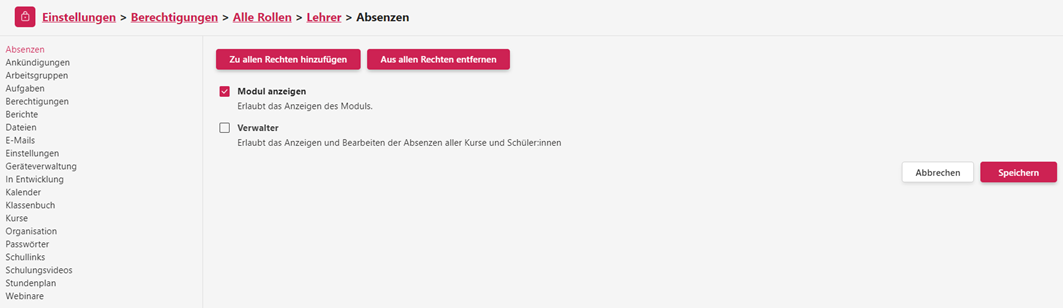
Wenn Sie auf **Berechtigungen verwalten** ([siehe Abbildung 7](https://docs.mnspro.cloud/administration-my.mnspro.cloud/mnspro-cloud/berechtigungen/berechtigungen-offnen.md)) klicken, öffnet sich ein Fenster, in dem Ihnen eine Vielzahl von Einzelrechten für Ihre Cloudumgebung im Allgemeinen und das digitale Klassenbuch im speziellen angezeigt werden (siehe Abbildung 8).
Abbildung 8. Rechte auswählen und zuteilen.
Hier sehen Sie auf der linken Seite eine Liste aller Rechte und Module, die für die ausgewählte Rolle freigeschaltet werden können. Bei jedem dieser Rechte können Sie entscheiden, ob die ausgewählte Rolle oder Rechtegruppe dieses Recht haben soll oder nicht. Ebenso können Sie entscheiden, ob das entsprechende Modul, wie zum Beispiel die E-Mailverwaltung, überhaupt angezeigt werden soll.
Wenn Sie eine Änderung an den Berechtigungen vornehmen möchten, markieren Sie einfach das Kästchen neben dem betreffenden Einzelrecht. Anschließend wird der Speicherbutton sichtbar und Sie müssen Ihre Änderung speichern. Das neue Recht wird für die Gruppe, für die Sie eine Änderung vorgenommen haben, unmittelbar nach dem Ausloggen und erneuten Einloggen gültig.
{% hint style="info" %}
In vielen Fällen wird ein Recht auch nach einem Neuladen des Browsers aktiv. Jedoch empfiehlt die AixConcept GmbH immer, sich auszuloggen und erneut auf My.MNSpro.Cloud
{% endhint %}
---
# Agent Instructions
This documentation is published with GitBook. GitBook is the documentation platform designed so that both humans and AI agents can read, navigate, and reason over technical content effectively. Learn more at gitbook.com.
## Querying This Documentation
If you need additional information that is not directly available in this page, you can query the documentation by asking a question.
Perform an HTTP GET request on the following URL with the `ask` and `goal` query parameters:
```
GET https://docs.mnspro.cloud/administration-my.mnspro.cloud/mnspro-cloud/berechtigungen/berechtigungen-verteilen.md?ask=&goal=
```
`ask` is the immediate question: it should be specific, self-contained, and written in natural language.
`goal` is what the user is ultimately trying to achieve, the reason they need the answer. Sharing it helps GitBook give you a better, more relevant answer. A goal is most helpful when it describes the outcome the user wants rather than restating the question. For example, with `ask=how do I create an API token`, a goal like `automate deployments from our CI pipeline` lets GitBook tailor the answer to that use case.
The response will contain a direct answer to the question and relevant excerpts and sources from the documentation.
Use this mechanism when the answer is not explicitly present in the current page, you need clarification or additional context, or you want to retrieve related documentation sections.