> For the complete documentation index, see [llms.txt](https://docs.mnspro.cloud/llms.txt). Markdown versions of documentation pages are available by appending `.md` to page URLs; this page is available as [Markdown](https://docs.mnspro.cloud/administration-my.mnspro.cloud/mnspro-cloud/profilvorlage.md).
# Profilvorlage
Eine der grundlegendsten Konfigurationen in MNSpro sind die Templates, auch bekannt als Profilvorlagen. Diese Vorlagen legen die Standardkonfiguration für alle zu erstellenden Benutzer, wie beispielsweise Lehrkräfte oder Administratoren, sowie für alle Gruppen wie Kurse oder Klassen fest. Personen werden später diesen Profilvorlagen zugeordnet, wodurch individuelle Rechte und Pflichten für die Nutzung von MNSpro definiert werden.
AixConcept hat bereits die wichtigsten Profilvorlagen für Sie erstellt und hinterlegt. Sie haben die Möglichkeit, diese Vorlagen nach Bedarf anzupassen, falls die voreingestellten Optionen nicht Ihren Anforderungen entsprechen. Alternativ können Sie auch komplett neue Profilvorlagen erstellen.
Dieses Kapitel soll Ihnen dabei helfen, sich mit den Profilvorlagen vertraut zu machen und sie effektiv zu nutzen.
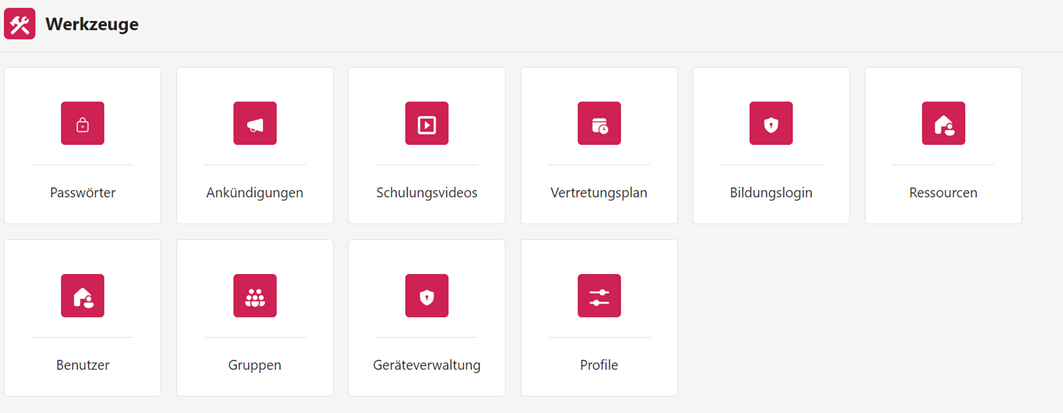
Zum Öffnen der Profilvorlagen klicken Sie dazu auf **Werkzeuge** und anschließend auf **Profile** (siehe Abbildung 6).
Abbildung 6. Übersicht der Werkzeuge.
---
# Agent Instructions
This documentation is published with GitBook. GitBook is the documentation platform designed so that both humans and AI agents can read, navigate, and reason over technical content effectively. Learn more at gitbook.com.
## Querying This Documentation
If you need additional information that is not directly available in this page, you can query the documentation by asking a question.
Perform an HTTP GET request on the following URL with the `ask` and `goal` query parameters:
```
GET https://docs.mnspro.cloud/administration-my.mnspro.cloud/mnspro-cloud/profilvorlage.md?ask=&goal=
```
`ask` is the immediate question: it should be specific, self-contained, and written in natural language.
`goal` is what the user is ultimately trying to achieve, the reason they need the answer. Sharing it helps GitBook give you a better, more relevant answer. A goal is most helpful when it describes the outcome the user wants rather than restating the question. For example, with `ask=how do I create an API token`, a goal like `automate deployments from our CI pipeline` lets GitBook tailor the answer to that use case.
The response will contain a direct answer to the question and relevant excerpts and sources from the documentation.
Use this mechanism when the answer is not explicitly present in the current page, you need clarification or additional context, or you want to retrieve related documentation sections.