> For the complete documentation index, see [llms.txt](https://docs.mnspro.cloud/llms.txt). Markdown versions of documentation pages are available by appending `.md` to page URLs; this page is available as [Markdown](https://docs.mnspro.cloud/benutzerinnen-und-benutzer/mnspro-cloud/meine-dokumente/einen-ordner-erstellen.md).
# Einen Ordner erstellen
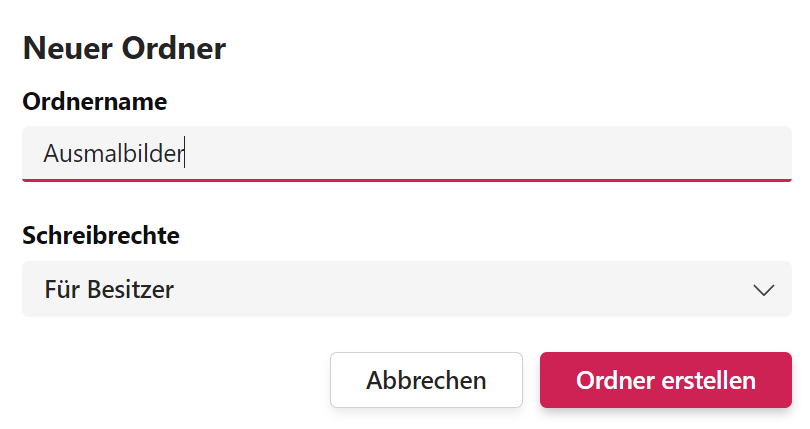
Um Struktur in Ihrer persönlichen Dokumentbibliothek zu schaffen, können Sie Ordner zur Ablage erstellen. Klicken Sie dazu auf die Schaltfläche **Neu** (Abb. 26) und geben Sie den Namen des Ordners ein. Bestätigen Sie abschließend durch Klicken auf die Schaltfläche Erstellen, und der Ordner wird erstellt!
Abbildung 26. Anlegen eines Ordners.
{% hint style="success" %}
Wenn Sie die Schreibrechte auf Besitzer setzen, können nur andere Lehrkräfte und Administratoren die Dateien bearbeiten. Wenn Sie die Schreibrechte auf Mitglieder setzen, können auch Schüler die Dateien verändern, sofern sie Zugriff auf die Daten haben.
{% endhint %}
Nachdem Sie einen Ordner angelegt haben, können Sie Dateien dort ablegen.
---
# Agent Instructions
This documentation is published with GitBook. GitBook is the documentation platform designed so that both humans and AI agents can read, navigate, and reason over technical content effectively. Learn more at gitbook.com.
## Querying This Documentation
If you need additional information that is not directly available in this page, you can query the documentation dynamically by asking a question.
Perform an HTTP GET request on the current page URL with the `ask` query parameter, and the optional `goal` query parameter:
```
GET https://docs.mnspro.cloud/benutzerinnen-und-benutzer/mnspro-cloud/meine-dokumente/einen-ordner-erstellen.md?ask=&goal=
```
`ask` is the immediate question: it should be specific, self-contained, and written in natural language.
`goal` is optional and describes the broader end goal you are ultimately trying to accomplish on behalf of the user. GitBook uses it to tailor the answer towards what is most useful for that goal.
The response will contain a direct answer to the question and relevant excerpts and sources from the documentation.
Use this mechanism when the answer is not explicitly present in the current page, you need clarification or additional context, or you want to retrieve related documentation sections.