> For the complete documentation index, see [llms.txt](https://docs.mnspro.cloud/llms.txt). Markdown versions of documentation pages are available by appending `.md` to page URLs; this page is available as [Markdown](https://docs.mnspro.cloud/benutzerinnen-und-benutzer/portal.mnspro.cloud/dashboard/meine-arbeitsgruppen/kachel-benutzer.md).
# Kachel „Benutzer“
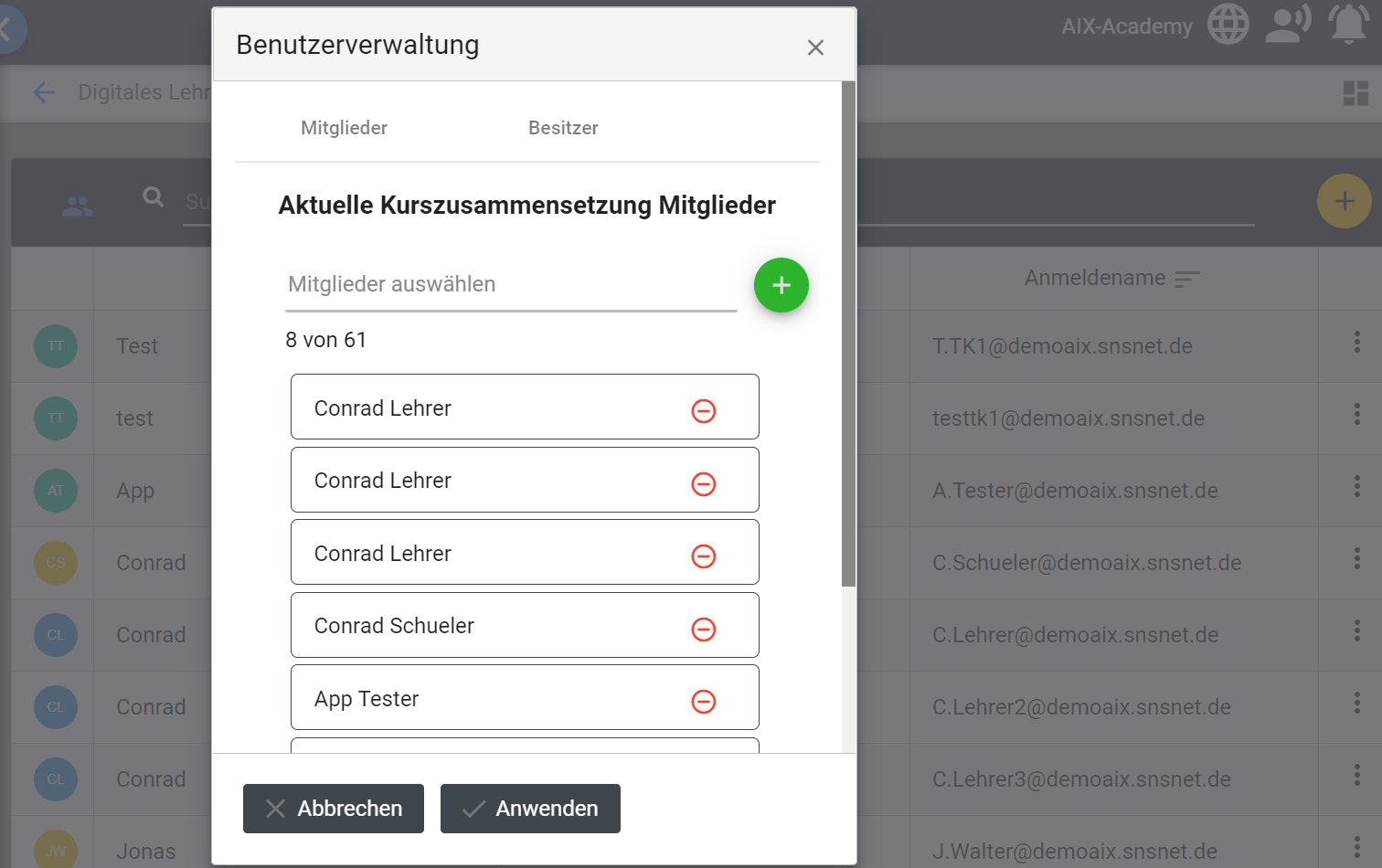
Über die Kachel Benutzer haben Sie die Möglichkeit die Liste der Kursteilnehmer einzusehen. Des Weiteren können Sie weitere Mitglieder zur Arbeitsgruppe hinzufügen oder Entfernen. Hierzu wählen Sie das gelbe Plussymbol oben rechts aus. Und es erscheint Ein Fenster zur Benutzerverwaltung dieser Gruppe (s. Abb. 78)
Abbildung 78: Arbeitsgruppen Mitglieder bearbeiten
Hier können Sie über das grüne Plussymbol weitere Teilnehmer hinzufügen. Wenn Sie den Reiter Besitzer auswählen (s. roter Pfeil, Abb. 78), fügen Sie über das grüne Plussymbol Besitzer der Gruppe hinzu. Über das Minussymbol entfernen Sie den entsprechenden Teilnehmer oder Besitzer.
**Nur Besitzer können Mitglieder hinzufügen oder entfernen. Teilnehmer können alle Schritte durchführen, bekommen mit dem Klick auf „Anwenden“ jedoch die Fehlermeldung, dass die „Aktualisierung der Gruppe fehlgeschlagen“ ist.**
---
# Agent Instructions
This documentation is published with GitBook. GitBook is the documentation platform designed so that both humans and AI agents can read, navigate, and reason over technical content effectively. Learn more at gitbook.com.
## Querying This Documentation
If you need additional information that is not directly available in this page, you can query the documentation dynamically by asking a question.
Perform an HTTP GET request on the current page URL with the `ask` query parameter, and the optional `goal` query parameter:
```
GET https://docs.mnspro.cloud/benutzerinnen-und-benutzer/portal.mnspro.cloud/dashboard/meine-arbeitsgruppen/kachel-benutzer.md?ask=&goal=
```
`ask` is the immediate question: it should be specific, self-contained, and written in natural language.
`goal` is optional and describes the broader end goal you are ultimately trying to accomplish on behalf of the user. GitBook uses it to tailor the answer towards what is most useful for that goal.
The response will contain a direct answer to the question and relevant excerpts and sources from the documentation.
Use this mechanism when the answer is not explicitly present in the current page, you need clarification or additional context, or you want to retrieve related documentation sections.